Building a Tracking Pixel
February 21, 2026
Tracking pixels have a simple job: return a 1x1 transparent gif. But they have to support a large load and any mistake can affect thousands if not millions of events downstream.
At my previous job, we would rank users every year and send them a badge they could show off on their website — similar to how restaurants flaunt Yelp stickers. The badge included a tracking pixel.
I built a serverless implementation inspired by that system deployed on AWS via Terraform to us-west-1 (I know, I know, but I used to live in California). Here’s the demo and the GitHub repo.
There are two endpoints exposed by this system: GET /p.gif and POST /e.
GET /p.gif is loaded on an HTML <img> tag and returns a 1x1 gif. Meant to be added on pages outside the org.
POST /e is internal. It supports custom events like clicking a button or closing a modal.
Here’s a short walkthrough of the system:
Watch on YouTube if the embed doesn’t load.
v0 Architecture
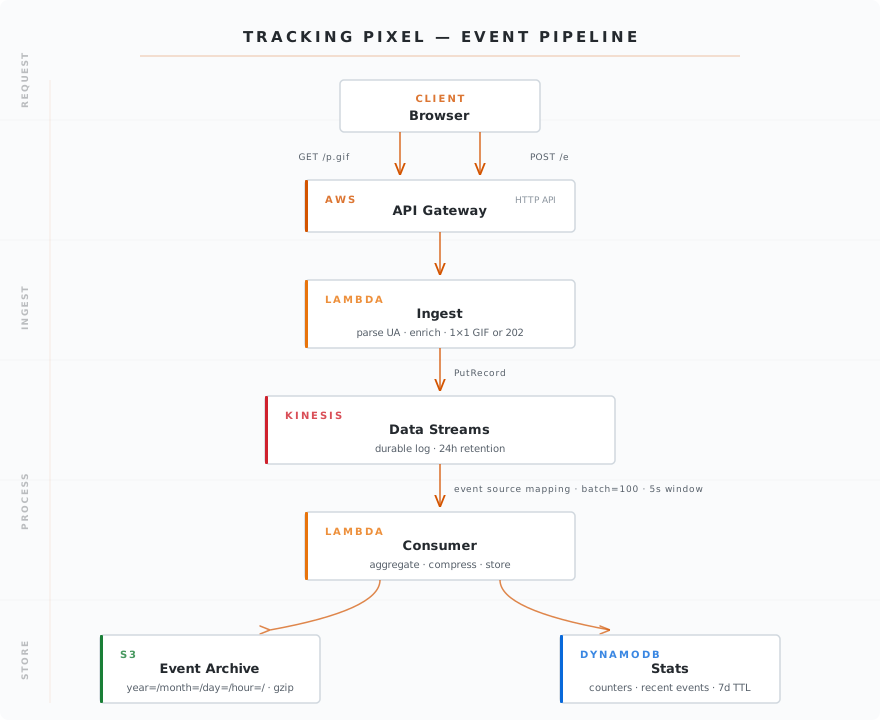
API Gateway
You don’t want to overwhelm your app server with analytics calls. At the end of the day, analytics are secondary to user interactions. All requests go to an API Gateway, integrated with an AWS Lambda. This is an easy task if you’re already using AWS. You should add throttling (API Gateway supports rate and burst limits out of the box) to make sure it’s not abused.
Ingest
Why have a lambda here in the first place and not integrate the API Gateway with Kinesis directly? It’s a place to format the data and enrich the event before it hits the stream. Mine parses the User-Agent, adds a server-side timestamp, writes the record to Kinesis and returns the pixel. Keep this lambda lightweight — it runs before Kinesis, so it doesn’t benefit from the stream’s buffering.
Data Stream
This is the critical piece of infra that’s enabling a high throughput suitable for analytics calls. Kinesis logs all the events from ingest and retains them for 24h (configurable up to 365 days). The idea is that ingest and consumption are now decoupled. It also allows retries if the consumer lambda fails.
The consumer Lambda doesn’t poll Kinesis itself — an event source mapping handles that. You configure BatchSize and MaximumBatchingWindowInSeconds to control how often the consumer is invoked. Mine is set to batch=100 and window=5s, meaning: invoke the consumer every 5 seconds or when 100 records accumulate, whichever comes first.
Consumer
This lambda is responsible for persisting data. It does two things in parallel:
-
Batches records to S3. This is the persistence layer of this project. Records are partitioned by time so they can be queried with Athena:
s3://tracking-pixel-events/events/year=2026/month=02/day=10/hour=21/{timestamp}.json.gz -
Updates DynamoDB. This was Claude’s idea (credit where it’s due). I wanted a good way to demo this project that even non-technical users could appreciate. It suggested a DynamoDB table to populate a dashboard showing recent events, page views over time, and top referrers. The table stores recent events and a couple of counters, all with a TTL of 7 days — it’s not meant for long-term storage, just enough to power a live view.
The consumer handler is concise:
export const handler = async (event) => {
  const records = event.Records.map(parseKinesisRecord);

  await Promise.all([
    writeToS3(records),
    updateDynamoDB(records)
  ]);
};
v1 Architecture
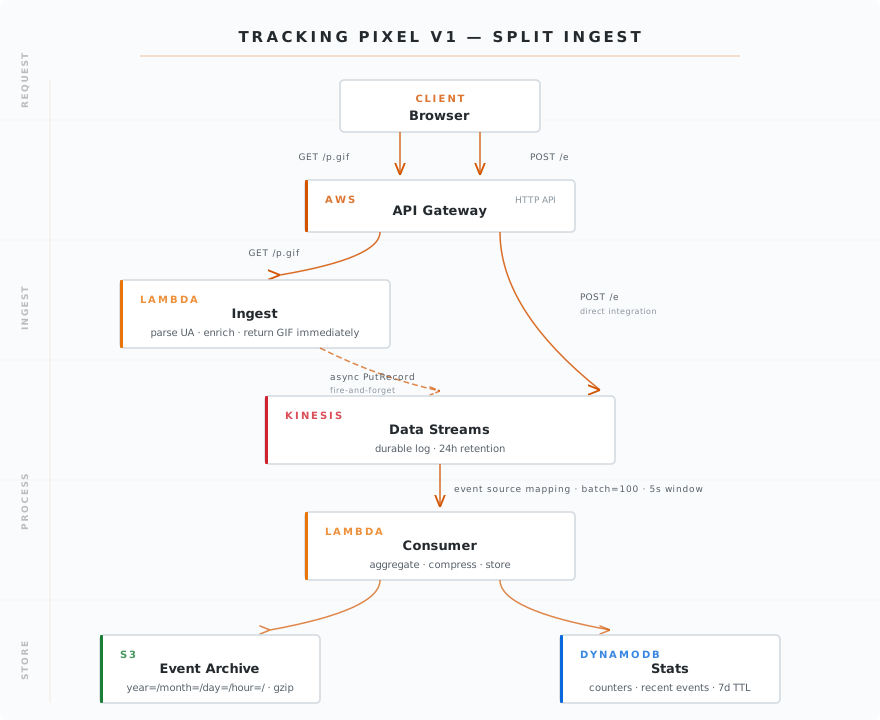
Problem
The Ingest lambda from v0 bothered me a bit for a couple of reasons:
- Bottleneck: even though it’s lightweight, it’s making a synchronous call to Kinesis, adding latency to every response. Kinesis still decouples ingest from consumption, but the caller has to wait for the
PutRecordcall to complete before getting a response. - It’s serving two endpoints that behave differently:
GET /p.gifis meant for external use and returns a pixel whilePOST /eis meant for internal use and has a payload.
Solution
POST /e can go directly from Gateway to Kinesis. There’s no need to enrich or format data in any particular way since it’s meant for internal use. That gets rid of the lambda bottleneck.
Unfortunately, that can’t be done with GET /p.gif. This endpoint needs to return a pixel and Kinesis does not support that. There’s a tradeoff here: I attempted to fire-and-forget:
    // Fire-and-forget: don't await the Kinesis put before returning the GIF
    putKinesis(record).catch((err) => {
        console.error("Kinesis PutRecord failed", { error: err?.message, requestId: record.requestId })
    })

    return {
        statusCode: 200,
        headers: {
            "Content-Type": "image/gif",
            "Cache-Control": "no-store, no-cache, must-revalidate, private"
        },
        body: PIXEL.toString("base64"),
        isBase64Encoded: true
    }
The lambda returns the pixel without waiting for Kinesis. There’s a real caveat here: when a Lambda function returns, AWS can freeze the execution environment immediately. That pending putKinesis() promise may never resolve if the environment is frozen or recycled before the call completes. This means data loss isn’t just “occasional” — it can happen regularly under certain invocation patterns.
I gave the fire-and-forget approach a chance but it didn’t work. After doing some manual testing, I estimate it was losing 1/3 requests. That’s unacceptable.
For now, I’ll just keep it as is: a synchronous request to Kinesis and then return. The alternative would mean adding a queue or response streaming, which is out of scope. If I revisited this, I’d look at Kinesis Data Firehose to replace the consumer Lambda entirely — it handles batching and delivery to S3 natively.
I found this exercise really helpful. Building a system from scratch feels totally different from maintaining one and adding features.
Written by Martin Camacho
← Back to blog